
Number Font Generator
Make your numbers look stylish using this Fancy Numbers Generator 🪄 copy paste any style with just a click.
150+ Free Number Fonts
Browse a library of 150+ stylish number fonts you can copy and paste instantly. Whatever look you’re going for, you’ll find a number style that fits — no design skills or downloads required.
Save Your Favorite Styles
Bookmark the number fonts you use most and build your own favorites list. Keep your go-to styles pinned at the top so they’re always one click away, ready to copy whenever you need them.
Over 250 Styling Options
Copy any fancy text and paste it into the text decorator to customize it at the full text, word, or character level.
Easy, Fast, and 100% Free
It’s completely free and super easy to use, providing a user-friendly and fast experience.
Make ordinary digits stand out with our Fancy Number Generator. Enter any number, explore different number font styles and cool fonts, and copy your favorite result in seconds. You can use the generated numbers in social media posts, profile names, gaming usernames, captions, lists, sale announcements, dates, and creative messages. Whether you want bold digits such as 𝟏𝟐𝟑, circled numbers like ①②③, or small raised numbers such as ¹²³, the tool gives you a quick way to create decorative numbers without installing a font, downloading an app, or editing an image. Simply type your numbers above and choose the cool number font style that best fits your content.
What Is a Fancy Number Generator?
A fancy number generator is an online tool that changes normal digits into decorative characters that you can copy and paste. For example, the number 12345 may appear in styles such as:
| Number style | Example |
| Normal | 12345 |
| Bold | 𝟏𝟐𝟑𝟒𝟓 |
| Double-struck | 𝟙𝟚𝟛𝟜𝟝 |
| Circled | ①②③④⑤ |
| Black circled | ❶❷❸❹❺ |
| Superscript | ¹²³⁴⁵ |
| Subscript | ₁₂₃₄₅ |
| Monospace | 𝟷𝟸𝟹𝟺𝟻 |
| Emoji keycaps | 1️⃣2️⃣3️⃣4️⃣5️⃣ |
Unlike a random number generator, this tool does not calculate or create new numbers. It keeps the digits you enter and changes only their visual appearance.
How Does the Number Font Generator Work?
Most copy-and-paste number generators use Unicode characters rather than traditional downloadable font files. Unicode is a standard that gives digital characters their own codes so they can be displayed and shared across compatible websites, operating systems, phones, and applications. That is why a styled number can usually be copied as text instead of being saved as an image. For example:
The styled result may look like a different font, but it is often a sequence of separate Unicode characters. This makes it convenient for bios, messages, comments, and other text fields that do not provide built-in font formatting.
How to Generate and Copy Fancy Numbers
Using the stylish number generator takes only a few steps.
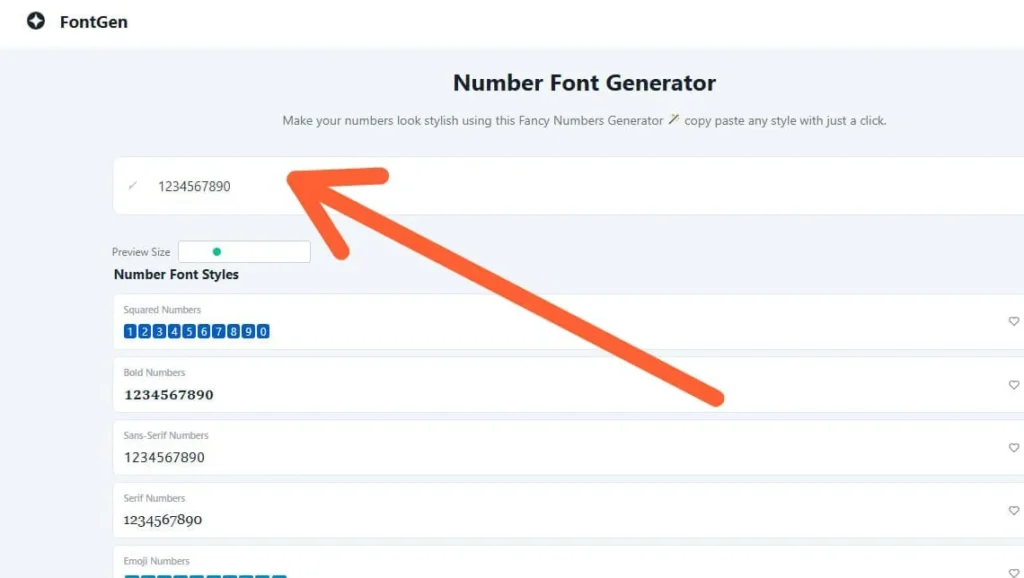
1. Enter Your Numbers
Type or paste the digits you want to customize into the input box. You can enter a single digit, a date, a score, a price, a percentage, or a longer number.
2. Browse the Number Styles
The tool will display your number in multiple decorative formats. Scroll through the results and compare bold, circled, bubble, superscript, subscript, monospace, emoji, and other available options.
3. Copy Your Favorite Style
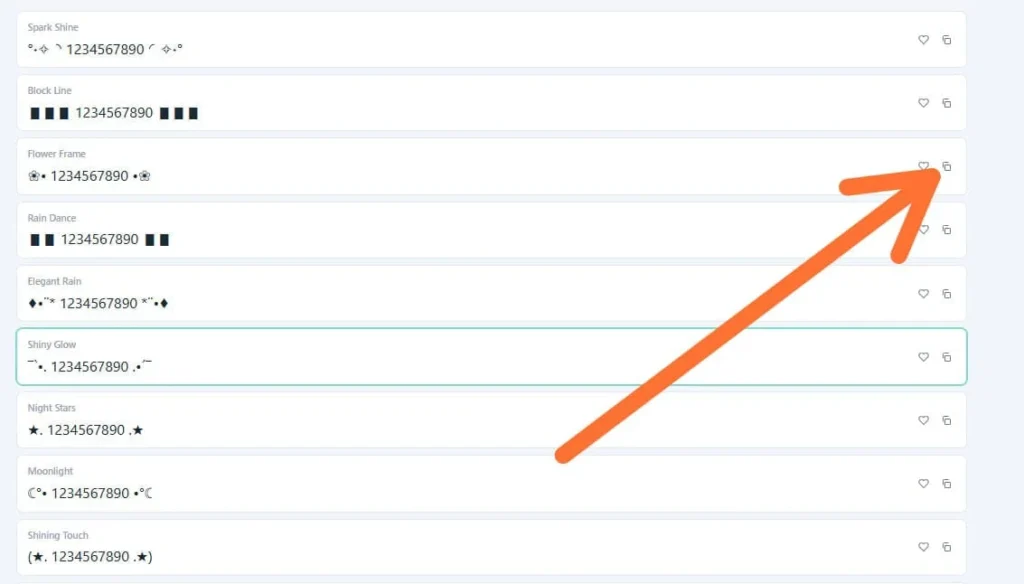
Click or tap the style you like. The generated number will be copied to your clipboard.
4. Paste It Where You Need It
Open your preferred app or website and paste the number into your bio, caption, message, username, post, or document. It is a good idea to preview the pasted text before publishing because some decorative characters may look slightly different across devices.
Where Can You Use Fancy Number Fonts?
Stylish numbers can make short pieces of information easier to notice. They are especially useful when a platform does not offer bold, outlined, circled, or decorative number formatting.
Social Media Posts
Use fancy digits in Instagram captions, TikTok profiles, Facebook posts, X posts, WhatsApp messages, and other social content. Examples:
Sales and Promotions
Bold or circled digits can draw attention to prices, discounts, launch dates, coupon amounts, and limited-time offers. Examples:
Lists and Rankings
Decorative numbers can be used to organize short lists, countdowns, instructions, rankings, and challenge posts. Examples:
Gaming Profiles
Players can use stylish numbers in display names, team names, scores, level information, or gaming bios where supported. Examples:
Dates and Special Occasions
Fancy digits can add a creative touch to birthdays, anniversaries, graduation years, event dates, invitations, and digital cards. Examples:
Popular Types of Fancy Numbers
Different styles work better for different purposes.
Do Fancy Numbers Work on Every Platform?
Fancy numbers work on many modern phones, browsers, social networks, and messaging apps, but no decorative character is guaranteed to display identically everywhere. The result depends on the platform, operating system, installed character support, and the font used by the receiving device. An unsupported character may appear as an empty square, question mark, or plain-looking symbol. Before using a fancy number in an important profile or announcement:
Phone numbers, verification codes, financial details, addresses, passwords, and other critical information should normally remain in standard digits.
Are Fancy Numbers Accessible?
Decorative characters can be harder for some people and assistive technologies to interpret. Web accessibility means making content usable by people with different abilities and methods of accessing the web. For better readability, use fancy numbers as a visual accent rather than styling every number on the page. Important information should also be available in ordinary digits. For example:
A simple style is usually more readable than a heavily decorated one.
Tips for Choosing the Best Number Style
Choose a style that matches the purpose of your content. Use bold digits for strong emphasis, circled numbers for lists, emoji digits for casual content, and monospace numbers for a clean technical appearance. Avoid combining too many number styles in one sentence because it can make the text look crowded. You should also consider the background and surrounding text. A simple number style often creates a stronger result when the rest of the design is already colorful or detailed.
Create Your Fancy Numbers
Enter your digits in the generator, compare the available styles, and copy the version that matches your content. Whether you are creating a sale announcement, profile name, numbered list, gaming identity, or special date, stylish number fonts provide a simple way to make ordinary digits more noticeable. Choose a readable style, test it on your intended platform, and use decorative numbers where they add value without making the message difficult to understand.
What Is a Fancy Number Generator?
A Fancy Number Generator is an online tool that changes regular digits into stylish number designs. It can create bold, circled, superscript, subscript, double-struck, monospace, emoji, and many other number styles. You can copy these fancy numbers and use them in social media posts, bios, usernames, gaming profiles, messages, and creative designs.
How Do I Copy and Paste Fancy Numbers?
Enter the digits you want to style into the Fancy Number Generator. The tool will instantly display your numbers in different formats. Once you find a style you like, click or tap it to copy the result, then paste it into your Instagram bio, TikTok caption, Facebook post, message, document, or another supported platform.
Are Fancy Numbers Real Fonts or Unicode Characters?
Most fancy numbers are Unicode characters, not traditional downloadable fonts. Unicode assigns a unique code to each symbol, allowing it to be copied and pasted as text. Although these digits look like different fonts, they are actually special characters that can be displayed on many modern devices and platforms.
Why Do Some Fancy Numbers Appear as Boxes or Question Marks?
Fancy numbers may appear as empty boxes, question marks, or missing symbols when your device, browser, application, or selected font does not support those Unicode characters. This does not always mean the number is broken. Try choosing a simpler style, updating the app, switching browsers, or testing the number on another device.
Do Fancy Numbers Work on Instagram, TikTok, and Facebook?
Yes, many stylish number fonts work in Instagram bios and captions, TikTok posts, Facebook updates, comments, and messages. However, support can vary depending on the platform and text field. Some websites may allow fancy numbers in captions but block them in usernames, account names, or profile links.
Can I Use Fancy Numbers in Usernames and Gaming Profiles?
You can use fancy numbers in many social media usernames, display names, gaming profiles, team names, and player IDs. However, some games and websites restrict special Unicode characters to prevent errors or confusion. It is best to test the selected style before saving your username or profile.
Why Do Fancy Numbers Look Different on iPhone and Android?
Fancy numbers may look different on iPhone and Android because both systems use different fonts and character designs. The underlying Unicode character remains the same, but its shape, thickness, spacing, size, or color may change. Emoji number styles can show even greater differences between devices.
Can Screen Readers Read Stylish Number Fonts?
Some screen readers can recognize certain fancy numbers, while others may pronounce them incorrectly, read their technical names, or skip them completely. For this reason, decorative numbers should not be the only way important information is presented. Use normal digits for prices, dates, phone numbers, instructions, and other essential details.
How Can I Convert Fancy Numbers Back to Normal Digits?
You can convert fancy numbers back to normal digits by using a reverse number converter. Paste characters such as 𝟙𝟚𝟛, ①②③, or ₁₂₃ into the tool, and it will change them into standard numbers like 123. Always check the final result when converting important information.
Are Fancy Numbers Safe to Use in Passwords, Phone Numbers, or Verification Codes?
Fancy numbers are generally safe for decorative content, captions, profile names, and creative text. However, they should not be used in passwords, phone numbers, banking details, verification codes, account numbers, or other sensitive information. A fancy digit may look like a normal number but can be treated as a completely different character by a website or application.
FAQS
Final Thoughts
A Fancy Number Generator is a simple but useful tool for making ordinary digits more attractive and noticeable. Whether you are creating a social media caption, sale post, gaming username, numbered list, or special date, stylish number fonts can help your content stand out. The best approach is to choose a style that matches your purpose while keeping the numbers easy to read.
Bold, circled, superscript, subscript, emoji, and monospace styles all create a different look, so test a few options before choosing one. Enter your numbers, explore the available styles, copy your favorite, and paste it wherever you need. Always preview the final result on your target platform to make sure every character displays correctly.