
Bold Text Generator
Type your text once and instantly get it in every bold font style. Tap the copy icon to grab any style and paste it anywhere.
A bold text generator changes normal letters into bold-looking Unicode characters that you can copy and paste. Enter your words, choose from different bold styles and cool fonts, copy the result, and use it in social media posts, profiles, captions, comments, or messages. There is no software to install and no font file to download. The generated text works like ordinary text, making it useful on platforms where standard bold formatting is limited or unavailable.
How to Use the Bold Text Generator
Creating bold text takes only a few seconds:
- Type or paste your text into the input box.
- Review the available bold text styles.
- Select the style that matches your purpose.
- Click the copy button beside your chosen result.
- Paste the text into your post, profile, message, or document.
You can use the tool on a computer, tablet, or smartphone. Before publishing, preview the text on the platform to make sure every character appears correctly.
Try a Simple Bold Text Example
You can convert a full sentence, but bold text usually works best for short headings, important numbers, calls to action, names, and key phrases.
What Is a Bold Text Generator?
A bold text generator is an online tool that replaces standard letters and numbers with similar-looking Unicode symbols. Although people often call the results “bold fonts,” they are not traditional font files like Arial, Roboto, or Times New Roman. They are separate characters with their own Unicode values. Many bold, italic, script, sans-serif, and Fraktur symbols come from Unicode’s Mathematical Alphanumeric Symbols collection. These characters were originally created for mathematical and technical notation rather than general text styling. Because the output consists of actual characters, it can be copied like ordinary text instead of being applied as a visual font setting.
Bold Unicode Text vs Regular Bold Formatting
Regular bold formatting changes the appearance of standard letters without replacing them. For example, a website may use HTML markup such as: <strong>Important message</strong> A word processor may apply bold styling when you press Ctrl + B or Command + B. A Unicode bold generator works differently. It replaces each normal character with a bold-looking alternative. For example:
This difference explains why generated bold text can sometimes appear in social media fields that do not offer a visible bold button.
Available Bold Font Styles
Different styles can create different moods. Select a clean option for professional content and a decorative option for creative posts.
| Style | Example | Recommended use |
| Serif bold | 𝐁𝐨𝐥𝐝 𝐓𝐞𝐱𝐭 | Offers, announcements and headings |
| Serif bold italic | 𝑩𝒐𝒍𝒅 𝑰𝒕𝒂𝒍𝒊𝒄 | Quotes and expressive phrases |
| Sans-serif bold | 𝗕𝗼𝗹𝗱 𝗧𝗲𝘅𝘁 | Clean social media hooks |
| Sans-serif bold italic | 𝘽𝙤𝙡𝙙 𝙄𝙩𝙖𝙡𝙞𝙘 | Updates and promotional lines |
| Bold script | 𝓑𝓸𝓵𝓭 𝓢𝓬𝓻𝓲𝓹𝓽 | Names, invitations and creative bios |
| Bold Fraktur | 𝕭𝖔𝖑𝖉 𝕱𝖗𝖆𝖐𝖙𝖚𝖗 | Gaming names and themed content |
| Bold numbers | 𝟏𝟐𝟑𝟒𝟓 | Prices, dates, discounts and statistics |
Highly decorative styles may be harder to read. For general use, serif bold and sans-serif bold are usually the clearest choices.
Where Can You Use Bold Text?
Generated text can be pasted into many online fields that accept Unicode characters.
Social Media Captions
Bold a short hook at the beginning of a caption to separate it from the remaining text. Example: 𝗡𝗲𝘄 𝗽𝗿𝗼𝗱𝘂𝗰𝘁 𝗷𝘂𝘀𝘁 𝗹𝗮𝘂𝗻𝗰𝗵𝗲𝗱
Add the normal explanation underneath so the complete caption remains easy to read.
Instagram Profiles
Use a clean bold style for a short service, title, location, or call to action in your Instagram bio. Example: 𝐃𝐢𝐠𝐢𝐭𝐚𝐥 𝐏𝐥𝐚𝐧𝐧𝐞𝐫𝐬
Avoid changing the entire profile description because excessive styled text can reduce readability.
Facebook Posts
Bold-looking text can help separate an announcement, discount, date, or important update from the rest of a Facebook post. Example: 𝗦𝗮𝗹𝗲 𝗲𝗻𝗱𝘀 𝗦𝘂𝗻𝗱𝗮𝘆
Follow it with clear standard text explaining the offer and its conditions.
LinkedIn Content
A short Unicode heading may help organize a LinkedIn feed post. However, LinkedIn articles already provide native options for bold and italic formatting. Native formatting is the better choice when it is available because it preserves the original letters and document structure.
Usernames and Display Names
Stylized characters can give a gaming profile, community name, or public display name a distinct appearance. Before saving the name, check whether the platform:
Do not use unusual Unicode characters in login credentials, email addresses, or information that must be typed exactly.
Comments and Short Messages
Bold characters can draw attention to a deadline, warning, answer, or important number. For example: 𝐃𝐞𝐚𝐝𝐥𝐢𝐧𝐞: 𝟏𝟓 𝐀𝐮𝐠𝐮𝐬𝐭
Use this approach carefully. A message with too many decorative characters may look less trustworthy or become difficult to scan.
When Should You Use Native Bold Formatting?
Use the platform’s own formatting feature whenever it is available. WhatsApp allows users to create bold messages by placing an asterisk on both sides of the text, such as *important*. Discord supports bold formatting through Markdown by placing two asterisks around the words: **important**. Reddit provides formatting through its Rich Text editor and, in supported desktop areas, its Markdown editor.
Reddit’s mobile formatting options have changed, so users should follow the controls currently shown in the app. Native formatting is generally preferable because it changes presentation without replacing the original letters. A bold text generator remains useful when:
Why Some Characters Do Not Change
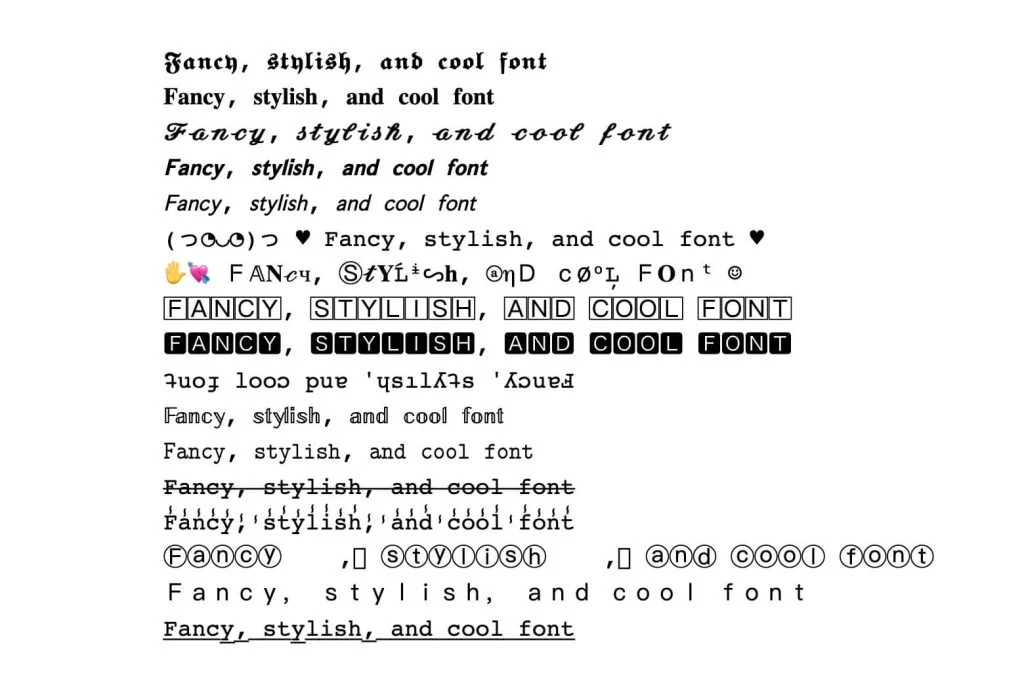
A generator may leave certain symbols unchanged. This can happen because a matching styled Unicode character does not exist for every letter, punctuation mark, emoji, or language. You may notice that:
When this happens, try a simpler bold style. Clean serif and sans-serif options generally provide broader character coverage than highly decorative alphabets.
Does Bold Unicode Text Work on Every Device?
Unicode is widely supported, but the final appearance can vary by operating system, browser, application, and installed character support. A style that looks correct on one device may appear slightly different on another. Older systems may fail to display some symbols. For better results:
- Use a simple bold style.
- Preview the text before publishing.
- Check it on both mobile and desktop.
- Avoid using generated characters for essential instructions.
- Keep a standard-text version of important information.
Accessibility and Readability
Bold Unicode characters can create accessibility problems when they are used heavily. Some screen readers may skip special characters or announce them in an unexpected way. For accessible content:
For example, instead of converting an entire promotion, style only the opening phrase: 𝗦𝗽𝗲𝗰𝗶𝗮𝗹 𝗢𝗳𝗳𝗲𝗿
Get 20% off selected products until Sunday. This layout creates visual emphasis while keeping the important details clear.
Tips for Creating Better Bold Text
Emphasize Only the Main Point
Choose one heading, discount, date, or call to action. When everything is bold, nothing feels important.
Select a Readable Style
Sans-serif and serif bold styles are suitable for most posts. Script and Fraktur characters are better for short decorative phrases.
Check Capitalization
Long lines written entirely in capital letters can feel aggressive. Use title case or sentence case for a cleaner result.
Preview Before Posting
Paste the generated result into the platform and check it carefully before publishing. Look for missing characters, broken spacing, or unexpected symbols.
Keep Searchable Words in Normal Text
Use ordinary characters for business names, product titles, locations, and phrases people may need to search or copy accurately.
Match the Style to the Message
A decorative script may suit a wedding invitation but look out of place in a professional announcement. Choose a style that supports the purpose of the content.
Common Uses for a Bold Text Converter
People commonly use bold letter generators for:
The tool is most effective when it improves visual organization rather than decorating every line.
FAQS
Final Thoughts
A bold text generator is a simple way to make important words, names, offers, and short messages stand out online. It works by converting normal letters into bold-looking Unicode characters that can be copied and pasted across many websites, apps, and social media platforms. For the best results, use bold text in small amounts.
Highlight only the most important part of your message and keep the remaining content in normal, readable text. Native formatting should always be your first choice when a platform already supports bold styling. Before publishing, check how the generated text looks on different devices. A clean and readable style will usually create more impact than an overly decorative option.