
Text Decorator
Make your text fancy in hundreds of different ways, and copy-paste your decorative text 🪄 with a single click.
Want to make your normal text look stylish before posting it online? Our Text Decorator helps you turn plain words into decorative text and cool fonts that you can copy and paste anywhere. You can use it for Instagram bios, Facebook posts, WhatsApp messages, TikTok captions, gaming names, usernames, comments, and short profile text. This font decorator is simple to use. Type your text, choose a cool font style or decoration, copy the result, and paste it where you need it. You do not need to install an app, keyboard, or design software.
What Is a Text Decorator?
A Text Decorator is an online tool that changes normal text into stylish, decorative, and creative text. It can add fancy letter styles, symbols, borders, spacing effects, and unique patterns around your words. For example, you can write your name, brand name, quote, caption, or username and turn it into a more attractive text style. Many people use decorated text to make their social media profiles look more personal and different. A Text Decorator is also known as a font decorator, fancy text generator, stylish font maker, decorative text generator, or copy and paste font tool.
How Does This Text Decorator Work?
This Text Decorator converts your regular letters into decorative text styles using special characters, symbols, and font-like text designs. These styles may look like real fonts, but most of them are special text characters that can be copied and pasted into different apps and websites. You do not need to download a font file. You only need to enter your text, choose a style, copy the decorated result, and paste it where you want to use it. Some platforms support all styles clearly. Other apps may not show a few special symbols correctly. For the best result, test your decorated text before using it in an important bio, profile, post, or username.
How to Decorate Your Text Online
Using this Text Decorator is quick and easy. You can create stylish text in a few simple steps.
Step 1: Enter Your Text
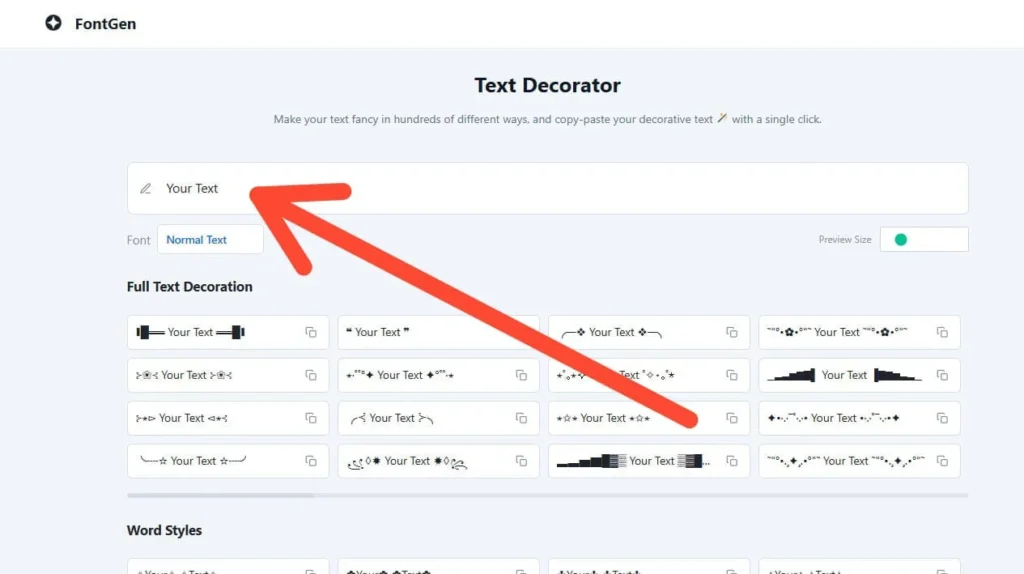
Type or paste your text into the input box. You can add your name, sentence, quote, caption, username, or short message.
Step 2: Choose a Font Style
Select the font style you like. You can try bold text, cursive text, small text, wide text, bubble text, gothic text, aesthetic text, or other stylish font options.
Step 3: Choose a Decoration Style
Pick how you want your text to be decorated. You can decorate the full text, each word, each letter, or the spaces between words.
Step 4: Copy and Paste
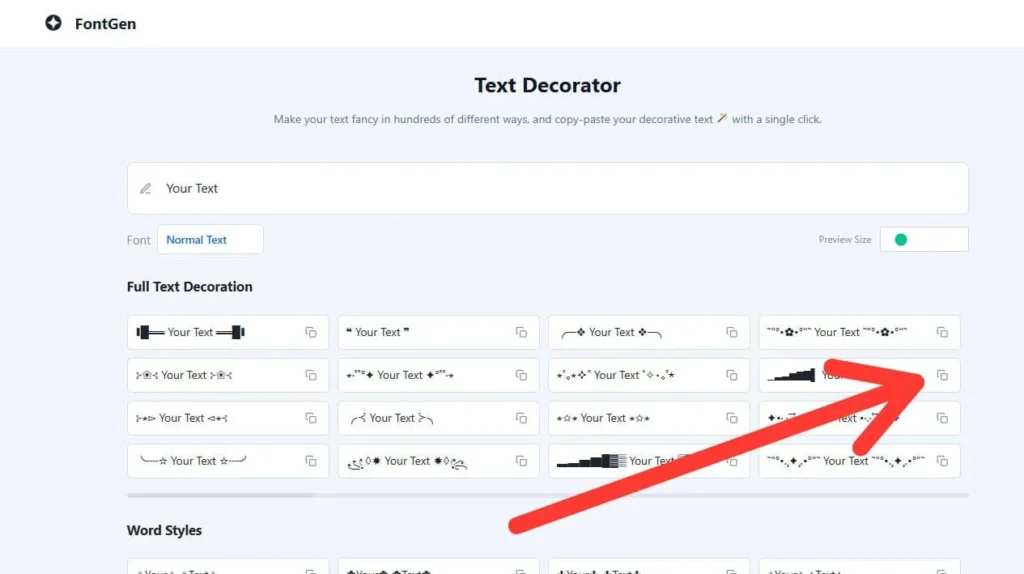
Click the copy button and paste your decorated text into Instagram, Facebook, WhatsApp, TikTok, Discord, YouTube, or any other supported platform.
Where Can You Use Decorated Text?
You can use decorated text in many places where normal text is allowed. This tool is useful for social media, messaging apps, gaming profiles, and short creative text.
Best Uses for a Text Decorator
A Text Decorator is useful when you want quick styling without creating an image or graphic. You can use it for:
The best rule is simple. Use decorated text where it improves the look, but keep your main message clear and readable.
Text Decorator vs Font Decorator
A Text Decorator and a Font Decorator are closely related tools, but they are not always exactly the same. A Text Decorator usually adds stylish designs, symbols, borders, and patterns around normal text. A Font Decorator or fancy font tool usually changes plain letters into stylish font-like characters. If you only want a different letter style, choose a font option. If you want your words to look more creative, use decoration styles as well.
Text Decorator vs Fancy Text Generator
A fancy text generator mainly changes plain text into stylish font-like letters. A Text Decorator can go one step further by adding symbols, spacing, borders, patterns, and creative effects around your text. Both tools are useful, but a Text Decorator gives you more design options when you want your text to look more unique.
Why Use Our Text Decorator?
Our Text Decorator is made for fast and easy text styling. You can create decorative text without editing images, installing apps, or using design software. You can use it to:
This tool is useful for students, creators, gamers, page owners, social media users, and anyone who wants their text to look different.
Tips for Better Decorative Text
Decorated text looks best when it is used carefully. Too many symbols can make a profile, caption, or message look messy.
Who Can Use This Text Decorator?
Anyone can use this Text Decorator. It is helpful for:
You can use it for fun, personal branding, or quick creative text formatting.
Common Text Decorator Problems and Fixes
A Text Decorator is easy to use, but decorated text may not always appear the same on every app, phone, or browser. Most problems happen because fancy text uses special characters, symbols, and Unicode-style letters. Some platforms support them well, while others may show missing boxes, broken letters, or strange spacing.
| Problem | Why It Happens | How to Fix It |
|---|---|---|
| Decorated text shows as boxes or squares | The app, browser, or device does not support that special character or font style. | Choose a simpler text style. Basic bold, italic, small caps, and light symbols usually work better. |
| Decorated text looks different on iPhone and Android | Different devices and operating systems display special characters in different ways. | Test your decorated text on more than one device before using it in a public profile or brand bio. |
| Decorated text will not paste on Instagram | Instagram may have clipboard issues, app bugs, or problems with long decorative characters. | Paste the text into your Notes app first, copy it again, then paste it into Instagram. Also try a shorter style. |
| Decorated text becomes too long | Some styles add extra symbols around each letter, word, or space. | Use shorter words, remove extra symbols, or choose a clean font style without heavy decoration. |
| Fancy text is hard to read | Some styles, like gothic, upside-down, glitch, or heavy symbol text, are difficult to read. | Use decorative text only for short names, headings, or bios. Keep important information in normal text. |
| Text decoration breaks after posting | Some platforms remove special spacing, unsupported symbols, or unusual characters after saving. | Preview your post before publishing. If the style breaks, use a lighter decoration style. |
| Username does not accept decorated text | Many apps, games, and websites only allow letters, numbers, dots, or underscores in usernames. | Use decorated text in your display name, bio, or status instead of your username. |
| Decorated text affects search visibility | Fancy Unicode-style text may not be read like normal letters by every platform search system. | Use normal text for important names, keywords, and searchable fields. Use decoration only for style. |
| Decorated text is not accessible | Some screen readers may read special characters one by one instead of reading the full word naturally. | Avoid fancy text for important instructions, business details, or long messages. Use simple decoration only. |
| Decorated text does not work in WhatsApp | WhatsApp supports many text styles, but some symbols may not show correctly on older phones or outdated apps. | Update WhatsApp, use shorter text, and choose a simpler decoration style. |
| Text looks messy after copying | The selected style may add too many symbols, spaces, or decorative marks. | Copy only one style at a time. Avoid mixing many fonts and symbols in one line. |
| Some symbols disappear after pasting | The platform may not support those symbols or may remove them automatically. | Try another style from the Text Decorator with fewer special characters. |
| Text spacing looks strange | Some decorative styles use wide spaces, invisible characters, or special separators. | Use a normal spacing style or remove extra spaces before posting. |
| Decorated text is not showing in a game name | Some games block special characters to prevent errors, spam, or unreadable usernames. | Check the game’s username rules and use simple letters or allowed symbols. |
| Copy button is not working | The browser may block clipboard access, or the page may need permission to copy text. | Manually select the decorated text, copy it, and paste it where needed. |
| Best fix for most Text Decorator issues | Most issues happen because the style is too complex for the app or device. | Use a clean, simple style. Simple decorated text works better on Instagram, Facebook, WhatsApp, TikTok, Discord, YouTube, and gaming profiles. |
Are Text Decorator Fonts Real Fonts or Unicode Characters?
Most Text Decorator fonts are not real installed fonts. They are usually Unicode-style characters, symbols, and special letters that look like different font styles. That is why you can copy decorated text from a Text Decorator and paste it into Instagram, WhatsApp, Facebook, TikTok, Discord, YouTube, and many other apps without downloading a font file. A real font changes how normal letters look inside a website, app, or design program.
Decorated text works differently. It replaces normal letters with special characters that already exist in Unicode-supported text systems. Best practice: use Text Decorator fonts for style, bios, captions, display names, and short creative text. Use normal plain text for important names, search keywords, contact details, and business information.
Why Does Decorated Text Not Work on Some Apps?
Decorated text may not work on some apps because every app, browser, phone, and operating system handles special characters differently. A Text Decorator creates fancy text using Unicode characters, symbols, spacing marks, and decorative styles. Most modern apps support many of these characters, but not all apps support every style.
If decorated text does not work, you may see boxes, missing symbols, broken letters, strange spacing, or text that changes after posting. To fix this issue, use a simpler Text Decorator style, avoid too many symbols in one line, copy a shorter version of the text, update the app, or paste the text into Notes first and then copy it again.
Can Decorative Text Affect Instagram, TikTok, or YouTube Search?
Yes, decorative text can affect search visibility in some cases. It does not mean your account will be punished, but fancy Unicode-style text may not match normal search terms the same way plain text does. For example, if your Instagram name is written in decorated letters, users searching your normal name may not always find it easily. The same idea applies to TikTok, YouTube, and other platforms where names, handles, captions, and descriptions are used for search. Best practice: use normal text for searchable words, brand names, usernames, video titles, captions, and keywords. Use decorated text for short style elements, bio highlights, or creative lines.
Is Decorated Text Accessible for Screen Readers?
Decorated text is not always accessible for screen readers. Some screen readers may not read fancy Unicode text as normal words. Instead, they may read each special character separately, which can make the text confusing for blind or low-vision users. For better accessibility, do not use decorated text for contact details, instructions, warnings, business information, pricing, addresses, educational content, or long captions. Use it only for short creative text, names, or visual style. A Text Decorator is good for style, but plain text is better for important information.
Can I Use a Text Decorator for Gaming Usernames?
Yes, you can use a Text Decorator for gaming usernames, display names, clan names, team names, and profile bios, but it depends on the game or platform rules. Some games allow special characters, while others only allow letters, numbers, underscores, or limited symbols. A decorated gaming name can help your profile look unique. However, special characters may make your name harder to search, mention, type, or remember. Best practice: use simple decorated text for display names, not account usernames. If your game rejects the style, try fewer symbols or use normal letters with one or two allowed symbols.
What Is Zalgo Text, and Should I Use It?
Zalgo text is a distorted, glitchy, creepy-looking text style made by adding many combining marks above, below, and around normal letters. It is often used for horror themes, memes, spooky captions, glitch effects, and creative usernames. You can use Zalgo text for fun, but it is not good for every place. It can be hard to read, may break page layout, may not display correctly on every app, and may be difficult for screen readers. Use Zalgo text for short horror captions, glitch usernames, creepy text effects, meme posts, and creative lines. Avoid it for business profiles, long captions, SEO titles, YouTube titles, Instagram name fields, readable bios, and contact information.
Why Is Copy and Paste Not Working on Instagram?
Copy and paste may not work on Instagram because of app bugs, clipboard issues, unsupported characters, long decorated text, or temporary platform behavior. Sometimes the copied text works in Notes or another app but fails in Instagram bio, captions, comments, or name fields. Try copying a shorter version of your decorated text, pasting it into your Notes app first, removing extra symbols, using a simpler Text Decorator style, updating Instagram, restarting your phone, or trying from a browser instead of the app. If your decorated text works in your bio but not in your username, the problem is likely Instagram’s username rules. In that case, use decorated text in your display name or bio instead.
Which Decorated Text Style Is Best for Instagram Bios?
The best decorated text style for Instagram bios is clean, short, readable, and easy to understand on mobile screens. Your Instagram bio should tell people who you are, what you do, and why they should follow you. Decorative text should improve the look, not hide the message. Use simple styles like small caps, light cursive, soft symbols, clean bold-style text, aesthetic spacing, minimal stars, or one-line decorative highlights. The best option is to keep your main keywords in plain text and decorate only one short line. This helps your bio stay stylish, searchable, and easy to read.
FAQS
Final Thoughts
A Text Decorator is a quick way to make normal text look stylish, creative, and personal. You can use it for social media bios, captions, usernames, gaming names, WhatsApp messages, and more. Type your text, choose a style, copy the result, and paste it anywhere supported. For the best result, keep your decorated text short, readable, and clean.