
Small Text Generator
Type your text once and instantly get it in every small font style. Tap the copy icon to grab any style and paste it anywhere.
Have you ever seen tiny letters in Instagram bios, gaming usernames, Discord profiles, or social media captions and wondered how people create them? A Small Text Generator makes this possible by converting normal words into small-looking text that you can copy and paste anywhere. These unique text styles are often used as cool fonts because they give ordinary words a more creative and eye-catching appearance. You do not need special fonts, apps, or design skills to create small text. Simply enter your words, choose a style, copy the generated result, and use it on your favorite platform.
Small text has become popular among social media users, gamers, content creators, and anyone who wants their profile or messages to look more creative. In this guide, you will learn what a small text generator is, how it works, where you can use it, its benefits, limitations, and useful tips for creating better-looking text.
What Is a Small Text Generator?
A Small Text Generator is an online tool that converts regular text into smaller-looking characters using special Unicode symbols. Unlike traditional fonts, these tools do not change the font installed on your device. Instead, they replace normal letters with Unicode characters that look smaller while still working as copy-and-paste text. For example:
This generated text can be used on many platforms that support Unicode characters, including social media websites, messaging apps, and gaming platforms. A small font generator is mainly used for decoration, personalization, and creating a unique online appearance.
How Does a Small Fonts Generator Work?
A small cute fonts generator works by matching regular keyboard characters with similar-looking Unicode characters. When you type a word, the tool searches for smaller versions of those letters and instantly creates a new text style. The process usually follows these steps:
- You enter your text into the generator.
- The tool converts normal letters into small Unicode characters.
- The result appears instantly.
- You copy the text and paste it wherever you want.
For example:
The process happens directly in your browser, so no downloads or installations are required.
Different Types of Small Text Styles
Small fonts generators can create different styles depending on your needs. Each style has a slightly different appearance.
| Small Text Style | Example | Common Uses |
| Small Caps | ᴄʀᴇᴀᴛɪᴠᴇ ɪᴅᴇᴀs | Instagram bios, profiles, headings |
| Superscript Text | ᴴᵉˡˡᵒ ᵂᵒʳˡᵈ | Captions, usernames, decorative text |
| Tiny Text | ᵀⁱⁿʸ ᵀᵉˣᵗ | Messages and short phrases |
| Decorative Small Text | Small letters with symbols | Creative designs and social posts |
The best style depends on where you plan to use it. For professional profiles, simple small caps usually look cleaner, while gaming profiles may use more creative styles.
How to Use a Small Text Generator?
Using a small text generator is simple, even if you have never used a text tool before. First, open the generator and type the word, name, or sentence you want to convert. The tool will automatically create different small text versions. After choosing your preferred style, copy the result and paste it into your desired platform. You can use small text for:
The entire process usually takes only a few seconds.
Where Can You Use Small Text?
Small text is popular because it helps users personalize their online profiles and content.
Small Text for Instagram Bios
Instagram users often use small text to make their bios look cleaner and more unique. For example:
Small text works well for short profile information because it adds style without taking extra space. However, avoid making your entire bio tiny because readability is still important.
Small Text for TikTok Profiles
TikTok creators use small text to make their profiles stand out. It can be used for:
A simple small text style can make a profile look more customized and memorable.
Small Text for Gaming Usernames
Gamers often want usernames that look different from regular names. This text generators help create unique-looking names for gaming communities. Examples:
Popular uses include:
| Platform | Usage |
| Discord | Usernames and server roles |
| Roblox | Player names and profiles |
| Minecraft | Character names |
| Online games | Clan names and tags |
Keep in mind that some games limit special characters, so always check platform rules.
Small Text Generator vs Font Generator
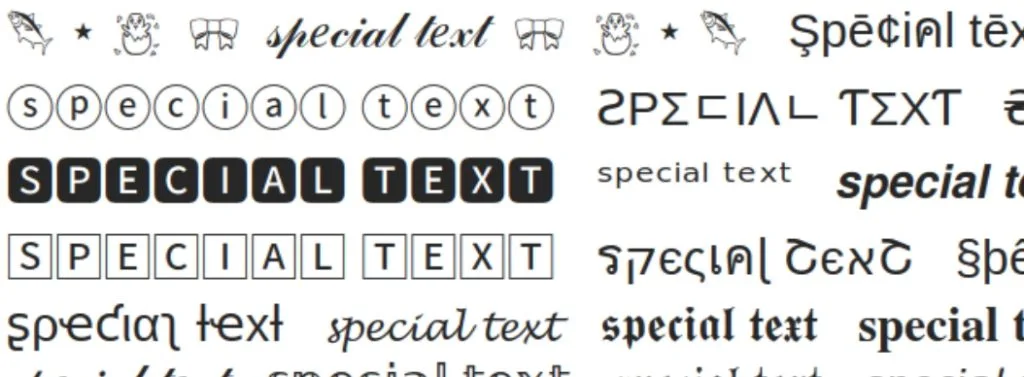
Many people think small text generators and font generators are the same, but they serve different purposes.
| Feature | Small Text Generator | Font Generator |
| Main Purpose | Creates smaller-looking text | Creates different visual styles |
| Technology | Unicode characters | Decorative text styles |
| Best For | Bios, usernames, captions | Logos, designs, creative writing |
| Appearance | Tiny and clean | Fancy and artistic |
If you want text that looks smaller, use this text generator. If you want a completely different style, a font generator may be better.
Benefits of Using a Small Text Generator
A small text generator offers a quick way to customize your online content.
Is Small Text Safe to Use?
Yes, this text generators are generally safe because they only create copy-and-paste characters. They do not install programs or make changes to your device. However, follow a few basic safety tips: Use trusted websites and avoid tools that ask for unnecessary personal information. Also, avoid entering private details such as passwords or confidential messages.
Limitations of this Text Generators
Although small text is useful, it is not perfect. Some platforms may not support every Unicode character. In some cases, users may see empty boxes or incorrect symbols. Small text can also become difficult to read when used excessively. This is why it is better to use it for short phrases rather than complete paragraphs. For websites, important information should always remain in normal readable text.
Tips for Creating Better Small Text
Small text looks best when used carefully. Use it for short words, names, or important highlights instead of long sentences. Combining normal text with small text often creates a better design. You can also explore other creative styles, such as using an upside down text generator, when you want to add a unique twist to your captions, usernames, or messages. For example: Welcome to my ᴄʀᴇᴀᴛɪᴠᴇ ᴘᴀɢᴇ This keeps the message readable while adding a stylish effect. Before sharing, check how your text appears on different devices because Unicode characters can look slightly different.
FAQS
Final Thoughts
A Small Text Generator is a simple tool that helps users create unique and creative text styles without installing anything. Whether you want a stylish Instagram bio, a different gaming username, or a more attractive caption, small text can help you personalize your online presence. The key is using it wisely. Small text works best when combined with normal text and used for short, meaningful phrases. When readability and creativity are balanced, your content can look cleaner and more professional.