
Underline Text Generator
Type your text once and instantly get it in every underline font style. Tap the copy icon to grab any style and paste it anywhere.
Creating attractive text is becoming more popular on social media, messaging apps, gaming platforms, and online profiles. A simple way to make words stand out is by using an underline text generator. This free online tool helps you transform normal text into stylish underlined characters and cool fonts that you can copy and paste anywhere. Whether you want a unique Instagram bio, a creative username, an eye-catching caption, or a highlighted message, an underline fonts generator makes the process quick and easy while helping your text look more creative and engaging.
Unlike traditional text editors where you need formatting options to underline words, this tool creates special Unicode-based underlined text that can work across different websites and applications. Simply type your text, choose an underline style, copy the generated result, and use it wherever you want.
Try These Underline Text Examples
| Normal Text | Underlined Text |
| Welcome | W̲e̲l̲c̲o̲m̲e̲ |
| Follow Me | F̲o̲l̲l̲o̲w̲ M̲e̲ |
| New Update | N̲e̲w̲ U̲p̲d̲a̲t̲e̲ |
| Creative Ideas | C̲r̲e̲a̲t̲i̲v̲e̲ I̲d̲e̲a̲s̲ |
What Is an Underline Text Generator?
An underline text generator is an online text formatting tool that converts regular words into underlined text styles without requiring any design software or coding knowledge. Normally, adding an underline requires tools like Microsoft Word, Google Docs, HTML, or a text editor with formatting features. However, many platforms such as Instagram, WhatsApp, Discord, TikTok, and gaming profiles do not provide direct underline formatting.
This is where an underline fonts generator becomes useful. The tool uses Unicode characters and combining marks to create the appearance of an underline below each letter. The generated text remains copyable, allowing users to paste it into different apps. For example:
The result looks like formatted text even when the platform does not support normal underline features.
How Does an Underline Text Generator Work?
An underline Cute Fonts generator does not actually apply traditional formatting like a word processor. Instead, it combines normal letters with special Unicode marks. Unicode is a universal character system that allows computers and devices to display text from different languages and symbols. When you enter text into the generator:
- The tool reads your original text.
- It adds special underline characters below each letter.
- It creates a new styled version.
- You can copy and paste the result.
The process happens instantly inside your browser, making it fast and convenient.
| Traditional Underline | Underline Text Generator |
| Uses formatting tools | Uses Unicode characters |
| Requires editing software | Works online |
| Limited to supported platforms | Can be copied to many apps |
| Not always portable | Easy to share |
How to Use an Underline Text Generator?
Using an underline text generator is very simple. You do not need technical skills or any special software.
Step 1: Enter Your Text
Type the words, name, sentence, or phrase you want to transform. Examples:
Step 2: Choose Your Favorite Style
Depending on the tool, you may find different underline options, such as:
Step 3: Copy the Generated Text
After creating your style, click the copy button. The text will be saved to your clipboard.
Step 4: Paste Anywhere
You can paste your underlined text into:
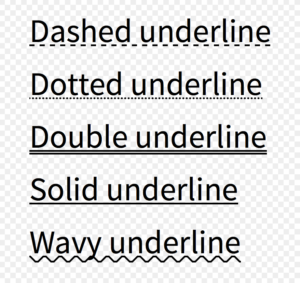
Popular Underline Text Styles
Different users prefer different text designs. Some want a simple professional look, while others prefer decorative styles. Here are some examples:
Simple Underline Style
S̲i̲m̲p̲l̲e̲ T̲e̲x̲t̲
Best for:
Double Underline Style
D̳o̳u̳b̳l̳e̳ U̳n̳d̳e̳r̳l̳i̳n̳e̳
Best for:
Decorative Underline Style
C̲r̲e̲a̲t̲i̲v̲e̲ T̲e̲x̲t̲
Best for:
Benefits of Using an Underline Text Generator
1. No Design Experience Needed: You do not need Photoshop, Canva, or advanced editing skills. Anyone can create attractive text within seconds.
2. Saves Time: Manually creating special text styles can be frustrating. A generator does the work instantly.
3. Improves Social Media Appearance: Social platforms are crowded. Unique text styles can help your profile information and captions get more attention.
4. Works Across Multiple Platforms: Generated underline text can be used on many popular platforms.
| Platform | Common Uses |
| Bios, captions, highlights | |
| Messages and status | |
| Discord | Usernames and server names |
| TikTok | Captions and profiles |
| YouTube | Descriptions and comments |
| Posts and comments |
5. Free and Easy Access: Most underline fonts generators are completely free and work directly in your browser. There is usually no need to download an app or create an account.
Where Can You Use Underlined Text?
Instagram Profiles
Instagram provides limited text formatting options. Many creators use underline text to organize their bios and highlight important information. Examples:
Example:
Before: Digital Creator Follow for Updates
After: D̲i̲g̲i̲t̲a̲l̲ C̲r̲e̲a̲t̲o̲r̲ F̲o̲l̲l̲o̲w̲ f̲o̲r̲ U̲p̲d̲a̲t̲e̲s̲
WhatsApp Messages
Sometimes you want certain words to stand out in conversations. Underline text can help highlight:
Gaming Profiles
Gamers often customize usernames and profile descriptions. Underline styles can make profiles look more unique. Examples:
Underline Text Generator vs HTML Underline
Many people confuse Unicode underline text with HTML underline formatting. They are different.
| Feature | Unicode Underline Text | HTML Underline |
| Requires coding | No | Yes |
| Copy and paste | Yes | No |
| Works in social apps | Usually | Limited |
| Used for websites | No | Yes |
| Needs browser support | No special setup | Requires HTML |
HTML underline is mainly used by website developers, while underline font generators are designed for everyday users.
Is Underline Fonts Generator Safe to Use?
Yes, most underline fonts generators are safe because they simply convert your text into another format. However, users should still follow basic online safety practices:
A simple text generator should only require your text input.
Does Underline Text Work on Every Device?
Underline text works on most modern devices, including:
However, some older apps or devices may display Unicode characters differently. If your generated text does not appear correctly:
FAQS
Final Thoughts
An underline text generator is a simple but useful tool for anyone who wants to make ordinary text more attractive. Whether you are creating a social media profile, writing a message, customizing a username, or designing online content, this tool helps you create stylish text instantly. You do not need technical knowledge or expensive software. Just enter your text, select an underline style, copy the result, and use it anywhere you want. For the best experience, choose simple underline styles that remain easy to read. Creative text is useful when it improves visibility without making your message difficult to understand.